Use Shell Script To Control Server By Websocket
Some time ago my kid was totally into Minecraft™. We started to build a world together. But the server was my computer. Switch off and the world was not available.
Luckily I had a mini PC available and started to figure out how to install and run a local Minecraft server.
Finally everything was up and running. But there was a catch. I only had one monitor and I don’t wanted to switch all the time to inspect and control the server. Of course there are now a lot of managers available. But none back since and none using a simple shell script to make the server console available via WebSocket.
These are the key specs I wanted to adhere:
- only shell scripts
- use command line applications
- no additional language runtimes
- docker image
Minimal features:
- control server from browser
Server Basics
The Minecraft server writes logs to stdout by default. Further it uses stdin to for receiving commands.
Starting the server from the command line you will get something like this:
onmessage NO LOG FILE! - setting up server logging...
onmessage [2020-07-09 11:46:11 INFO] Starting Server
onmessage [2020-07-09 11:46:11 INFO] Version 1.16.1.2
onmessage [2020-07-09 11:46:11 INFO] Session ID XXXXXXXX-XXXX-XXXX-XXXX-XXXXXXXXXXXX
onmessage [2020-07-09 11:46:11 INFO] Level Name: world
onmessage [2020-07-09 11:46:11 ERROR] Error opening whitelist file: whitelist.json
onmessage [2020-07-09 11:46:11 INFO] Game mode: 0 Survival
onmessage [2020-07-09 11:46:11 INFO] Difficulty: 2 NORMAL
onmessage [2020-07-09 11:46:11 INFO] opening worlds/world/db
onmessage [2020-07-09 11:46:16 INFO] IPv4 supported, port: 19132
onmessage [2020-07-09 11:46:16 INFO] IPv6 not supported
onmessage [2020-07-09 11:46:16 INFO] IPv4 supported, port: 42369
onmessage [2020-07-09 11:46:16 INFO] IPv6 not supported
onmessage [2020-07-09 11:46:17 INFO] Server started.
Now you can type in e.g. stop. And the server would gracefully shut down.
In this case the server in running in the foreground of the current terminal shell. You can only do concurrent work now, if you started the server in a server configured with multiple screens or from a desktop terminal window.
You could start the server in the background using &. But now you don’t see the logs written to stdout and you are not able use the stdin of the server directly with your keyboard anymore.
Docker
To solve this problem I used a docker image and started a container on my machine.
- the server logs can now be read via
docker logs $(docker ps --filter name=mc-server). - you can connect to the Minecraft server
stdoutandstdinto control it usingdocker attach $(docker ps --filter name=mc-server).
This solves how to connection reliable to a Minecraft server running in an background process. If the Docker host demon is available via network (don’t do that without setting up security) one could manage the server by connecting to the Docker host from a remote machine.
But you still need some Docker client on the remote machine. That requires some setup and this was something I tried to avoid. Somehow you should be able to connect to the Minecraft server directly by network.
I remembered that I have used NCat nc before to forward an private MySQL server via ssh to my local machine. So I dwelled into the manual again…
Ncat
From the user guide (https://nmap.org/ncat/guide/index.html)
Ncat is a general-purpose command-line tool for reading, writing, redirecting, and encrypting data across a network. It aims to be your network Swiss Army knife, handling a wide variety of security testing and administration tasks.
Ncat in the listen mode is registering a network socket and waits for a network connection.
For example nc -l 8080 is waiting for an connection on TCP binding to port 8080 on all locally available network interface.
Ncat reads from stdin to send and write to stdout what was received from the network. This way you can forward the the stdin and stdout of every application to a network socket.
For Example :
$nc -l 8080 --sh-exec "echo `test`" &
&nc localhost 8080
test
But this doesn’t work for the Minecraft server. I want to start the server. Serving sessions to the Minecraft world for players connecting. This must not rely on that somebody is connecting to the server console.
Somehow it should be possible to get the Minecraft server stdin and stdout and to connect these to NCat similar to this command (not working):
nc -l 8080 --keep-open > mc_in < mc_out
That put me back again digging into documentations and found…
Named Pipes
Unix pipes are essential to connect two or more programs by connection their stdin and stdout streams.
Example:
echo "Test" | cat is connecting stdout of echo test to stdin of cat.
The output looks like:
$ echo "Test" | cat
Test
Beside these unnamed pipes you can create first in first out named pipes using mkfifo.
(Always make sure to remove named pipes after usage because they are take inodes of the file system like any other file.)
Example:
- Create name pipe
pipe. - redirect
stdoutof echo topipe. - Execute
echoin a background process. echostarts writes to thepipeand is waiting that someone is reading the output ofpipe.- Next redirect
stdinofcatwithpipe. catstarts and reads frompipe.echocan complete because thepipeis read andcatoutputs the content read frompipe
The above should looks like:
$ mkfifo pipe
$ echo "Test" > pipe &
$ cat < pipe
Test
$ rmfifo pipe
This was exactly what I needed to get hold of the Minecraft server stdin and stdout.
A Minecraft console by TCP forwarder
Now all the pieces almost fall into place on their own.
First I created to named pipes:
mkfifo mc-in
mkfifo mc-out
Next start the Minecraft server:
$./mc > mc-out < mc-in &
Now start Ncat:
nc -vlk 49999 > mc-in < mc-out &
After that you can connect to the listening Ncat process with:
$nc localhost 49999
onmessage NO LOG FILE! - setting up server logging...
...
You can connect from an remote machine to. But there is no real protocol used only a TCP socket sending and retrieving text.
But I wanted to access the server simply using a web browser.
OK. Here we go again back to search mode. After some more digging I found something interesting…
websocketd
From the website (https://websocketd.com)
websocketd is the WebSocket daemon
It takes care of handling the WebSocket connections,
launching your programs to handle the WebSockets,
and passing messages between programs and web-browser.\It’s like CGI, twenty years later, for WebSockets
That sounds interesting. Essentially it:
- creates a new instance of an application on each incoming WebSocket connection
- sends everything read from process
stdoutto the client - reads everthing retrieved from the client to
stdinof the process - finally it stops the process after the connection is closed
That sounds a lot like what I need for my Minecraft server. Beside please don’t start a Minecraft server for each connection…
Providing a WebSocket Minecraft console
Up until now we had a TCP listener waiting for connections and connect to the stdin and stdout of the Minecraft server (via named pipes).
All we need now is that websocketd is connecting to the stdin and stdout of an Ncat configured to connect over the network to the listening Ncat:
websocketd --port=8080 nc localhost 49999
Adding --devconsole and you don’t even have to build a Html page to test the WebSocket.
Just browse to https://localhost:8080 (Or the network address, machine name or DNS entry) and you will see a page asking to connect to ws://localhost:8080.
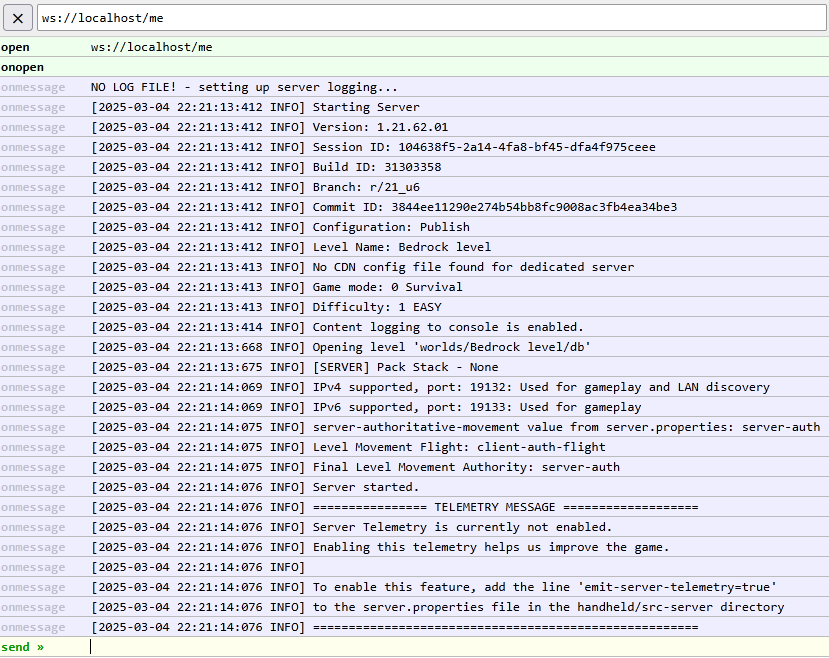
Doing so you will see the output of the Minecraft server.
Final words
My final implementation can be found on Github.
I hope this exercise is providing value. I found getting along without falling back to coding and simply stick to others command line applications was fun and inspiring.